
 Lobby
Lobby Slots
Slots Live Casino
 Bonus Codes
 Login
Login VIP Club
 VIP Program
 Tournaments
 Install App
 Payments



 Search Game
Spirit Casino Login and Registration Page for Australian Players
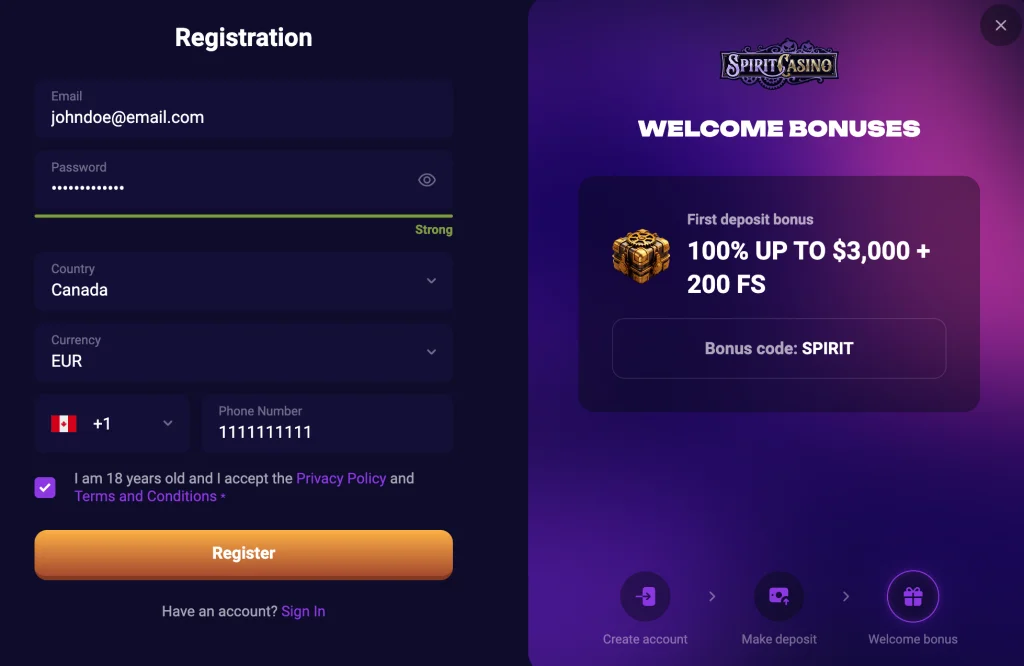
Becoming a Spirit Casino player is easy. You only need to be of the eligible gambling age and reside in Australia. There is no technicality to the process as the information we request is common and only helps to confirm your eligibility. The Spirit Casino login process is even easier. You just need to provide your email and password to access your Spirit Casino profile on any device.
Easy Spirit Casino Sign-Up Procedure in 4 Clicks
Spirit Casino registration process is straightforward and can be completed within 3 minutes. Here is a description of the entire process.
- Hit the Sign Up icon in the top right corner of the screen. The action will pop up a registration field to submit certain information.
- Fill in a personal email address you have full access to and create a unique password for your profile. Your password must include at least one number and a letter. Submit your phone number and confirm Australia and the AUD as your resident country and preferred transacting currency.
- Tick the relevant box to confirm that you are 18 or older and accept our privacy policy.
- Tap on the Sign Up icon to create your player profile.
During this initial Spirit Casino registration, you are not required to provide your personal information. You will satisfy this important requirement during the verification process. Your created account will allow you to bet on titles and score winnings.
Profile Verification and Required Data
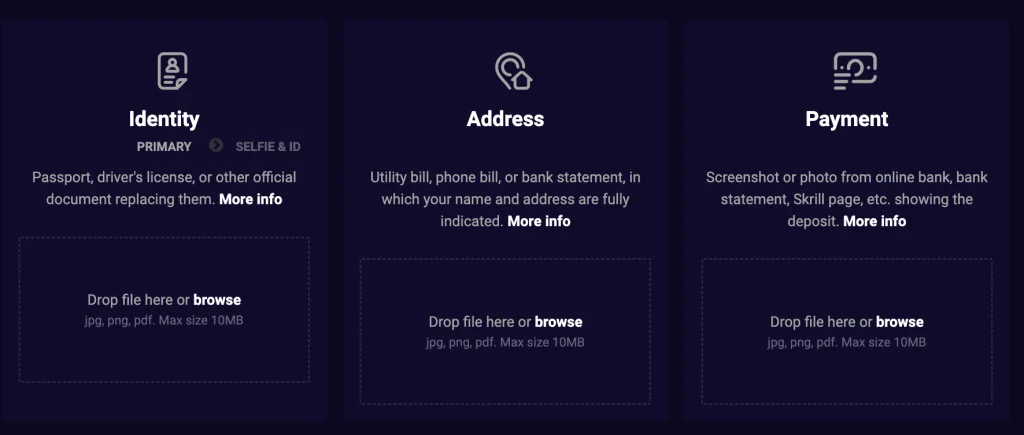
While you can play and earn winnings after completing your Spirit Casino sign up, withdrawal is only possible after profile verification. We request players to verify their accounts to confirm that they reside in Australia, are at least 18 years old and can complete online payments. See all the information you need to provide to become verified.
- Sign in to your profile and click on the Human icon at the top right of the casino.
- Hit the Verification button to open up a new window with three tabs: General, Verification and Security.
- Click on the General icon to enter a page where you have to provide some personal information such as name, gender, date of birth, city, home address and postal code. Save the update after confirming that all provided information is accurate.
- Hit the Spirit Casino Verification tab to access three image fields for confirming your identity, address and ownership of an online payment method. You also have to verify the phone number provided during registration in this field.
- Identity Verification: Upload an image of your driver’s licence, passport or any official ID to confirm your identity and age.
- Address Verification: Upload a photo of your bank account statement or a utility bill to verify your address. Ensure that the bill is not older than 3 months and bears the address you filled in the General tab.
- Payment Verification: Take a pic of your E-wallet front interface or a credit card bearing your name to confirm you own an acceptable online payment solution. You do not have to reveal any sensitive details on your uploaded image.
- Mobile Verification: Hit the Verify button to receive a special phone verification code to the number you submitted as yours during sign up. Confirm the code on your phone to complete the mobile number verification.
How to Log In to Spirit Casino
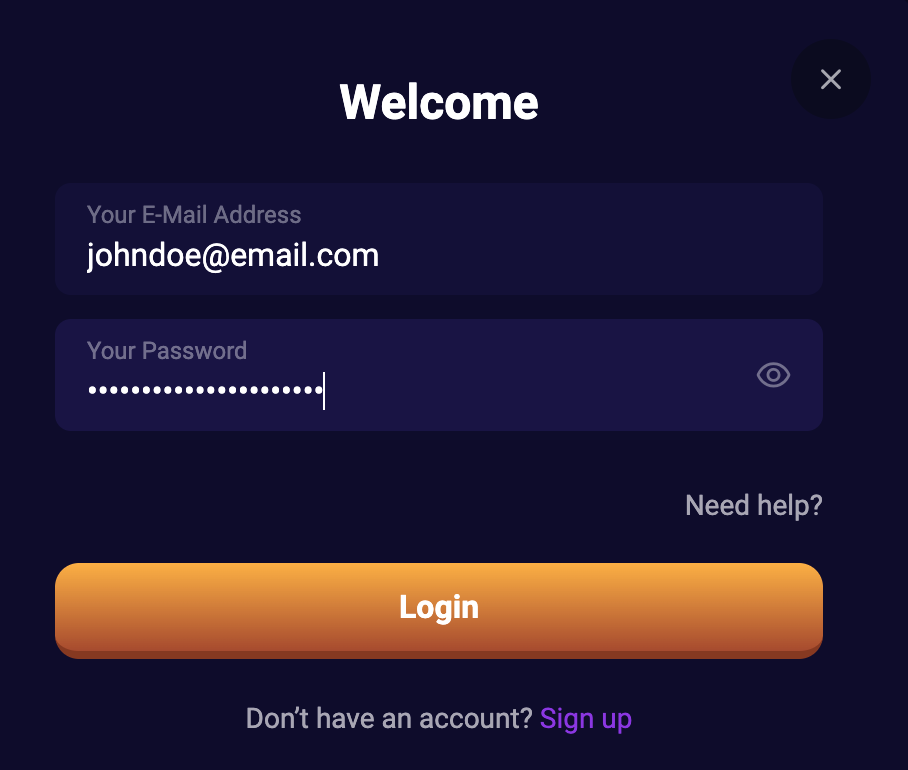
After creating and verifying your account, you get full control of it and can access it on any device. You only need your email and password to log in. Both details are your Spirit Casino login information.
See how to log into your profile.
- Click on the Log In Menu at the top right of your screen.
- Fill up your email and password in their respective fields.
- Tap the Spirit Login icon to access your account.
The above steps are all it takes to access your profile on this platform. However, you can make the login process a bit more secure with the Two Factor Authentication protocol (2FA). With an active 2FA system, every login attempt from a new device will require you to submit a code sent to your mobile device. This reinforcement makes it impossible for someone to access your profile even if they manage to get your password and email.
You can set up the 2FA by heading to the Security tab we talked about in the Verification section. Android users have to install Authenticator, while iOS players need to download Authy to link the 2FA system between their phone and casino profile.
Spirit Login Process in the Mobile App
This casino allows you to log in to your profile with a mobile phone, even if you registered on a PC. The service and experience on PC are the same as those of the smartphone. So the Spirit Casino login process discussed above does not change for those who gamble with Android and iOS smartphones and tablets.To sign into your profile via the mobile website or app, simply click on the Spirit Casino Login menu and provide your email and password. You may then access your profile and enjoy on-the-go gambling.
Account Holder Details
Only gambling Aussies who provide true information about themselves can complete their Spirit Casino registration and verification. We are very particular about knowing members of our community to protect everyone. Also, this requirement is in line with the Curaçao Gaming Control Board’s demand, which provides our operating licence. With your info, we can confirm that you are 18 or older and have a reliable source of income to gamble without issues.
This casino will never abuse the details you share or offer them to any unauthorised party. We prioritise confidentiality and reinforce both our website and app with the SSL Encryption model to protect your data.
Common Login Problems with Your Spirit Casino Account
While this casino is all about an easy login process, we are aware that some members, especially newly registered Aussies may experience occasional issues. See the most popular Spirit login issues you may encounter.
- Can’t log In despite having the correct password. The solution to this concern is to confirm that you are filling in the right combination while maintaining the appropriate capitalisation of each character. If this does not work, then it may be a case of website downtime. Downtimes are rare, and you can trust us to fix such issues within the quickest possible time if it ever happens.
- Error Description After Tapping Log In: If an error tag comes up whenever you attempt to sign in, then it could be due to a poor internet connection or an outdated browser. Confirm that your internet is great and also try another browser.
Removing Your Profile from the Platform
The moment you complete your Spirit Casino sign up, you become a part of our community and will enjoy the best services. However, if you ever wish to deactivate your casino account, we will make the process as seamless as possible. You can delete your profile by following these steps.
- Sign in to your profile and clear your cashable real money balance.
- Contact our customer service agent via the live chat option.
- Explain that you want to deactivate your account permanently. The agent may recommend the Self-Exclusion option if you actually just want a break from gambling.
- Maintain your stance to delete your profile and we will deactivate it within 24 hours.
How to Reset Your Password
Players who forget their password can get a new one and retain their earned progress on their existing profile. Here is what to do if you ever forget your password combination.
- Go to the Spirit Casino login page and tap on the Forgot Password link.
- Provide the email you used for creating your account.
- Check your email inbox and click on the verification link we sent to you. The action takes you to a page to create a new password.
- Create a new password and confirm it.
- Head back to the Log In window and sign in with your account using the new password.